Author Archives: Ashish Gohel

Ashish Gohel
Ashish Gohel is a Lead UI/UX Designer with 15+ years of experience crafting high-impact digital products across OTT (Discovery+), automotive (TVS Cluster), fintech (NPCI), news media (The Indian Express), and lifestyle (Dancer app). At Robosoft, he aligns user insights with business objectives to deliver intuitive, scalable experiences. He integrates AI-powered methods and design operations to create solutions that delight users and drive innovation. Having led cross-functional teams across industries, he brings a system-thinking approach to every stage of the design process. Passionate about fostering design culture and mentorship, he strives to build digital products that are personal, purposeful, and effortless.
UX/UI Design

Engineering Next‑Generation Connected TV Experiences for the Big Screen

A household group watching an immersive Connected TV experience on a large screen, with a live sports broadcast extending beyond the screen into the living room

Connected TV is no longer a distribution surface. It is becoming the operating system of the living room, where household engagement, monetization, and retention are decided.

Next‑generation CTV is shifting from browsing to intent‑predicted engagement, powered by AI, household‑level data, and resilient platform engineering. Streaming businesses that treat CTV as a full‑stack capability, spanning performance, intelligence, monetization, and operational resilience, will outpace competitors still approaching it as “mobile on a bigger screen.”

Where households decide to stay or leave

First‑session abandonment on Connected TV remains stubbornly high. Subscribers download apps, browse briefly, and exit before content value is fully assessed. 

In those early moments, households were not judging catalog depth. They are judging whether the service belongs in the living room: onboarding friction, navigation clarity, discovery effectiveness, and playback reliability. 

Connected TV is where streaming businesses are won or lost, yet it is frequently where product organizations are least operationally prepared.
Ashish Gohel Lead UI/UX Designer

CTV apps are becoming intelligent living‑room platforms

This is not a UX trend. It is a capability shift.

Next‑generation CTV reduces decision fatigue by anticipating intent rather than waiting for explicit input:

  • Predictive discovery based on household viewing patterns
  • Context‑aware recommendations shaped by time‑of‑day and session type
  • Mood‑driven search using natural language intent
  • Cross‑device intent recognition, where discovery begins on mobile and resolves on TV
  • Real‑time personalization across household profiles, not static personalization

Discovery is no longer a menu problem. It is an engagement system.

What AI is changing in CTV

AI is not just improving recommendations. It is restructuring the economics of content discovery.

The cost of serving the right title to the right household at the right moment is falling to zero. The cost of a wrong recommendation, an abandoned session, a cancelled subscription, a household that never returns, is rising. That asymmetry is what makes AI infrastructure a strategic investment, not a feature.

Concretely, this means:

Generative AI is rewriting the discovery interface

Voice input powered by large language models moves beyond keyword search into genuine intent understanding. A household saying “something light for after dinner” gets a relevant result, not a confused one. First‑session success rates improve. Personalization signals accumulate faster.

AI is collapsing with the gap between signal and action

Earlier generations of recommendation engines updated on a cycle, daily or weekly. Real‑time AI inference means the platform responds to what a household is doing now: switching profiles mid‑session, abandoning a title at the twelve‑minute mark, returning after a two‑week gap. Each signal feeds back into the model immediately.

AI-curated home screens are replacing static content rows

The home screen is no longer a merchandising decision made by an editorial team once a week. It is a continuously updated, household‑specific surface, the single most valuable piece of real estate on the platform, dynamically managed at scale.

The platforms investing in this infrastructure now are not building a better recommendation engine. They are building a compounding retention advantage that widens every quarter.

The multi‑device reality: CTV as the household hub

Households move fluidly across devices. Discovery often starts on mobile, continues on tablets, and culminates on the TV, sometimes within the same session.

The engineering target is not a single‑screen experience but continuity across the household’s device graph: maintaining play state, profile context, and discovery intent across environments.

Beyond the “10‑foot experience”: intelligence determines outcomes

Usability fundamentals, including legibility, safe areas, focus behavior, and accessibility, remain at table stakes. The differentiator is what sits on top of them.

Navigation becomes an intent flow

Next‑gen platforms reduce steps by arranging UI around predicted household intent. Navigation shifts from finding to confirmation.

The remote becomes conversational

Voice input, increasingly powered by Generative AI, enables contextual discovery, faster first‑session success, and continuously strengthening personalization signals.

Monetization expansion: FAST and commerce move to center stage

FAST platforms, including Pluto TV, Roku Channel, Samsung TV Plus, and Tubi, are expanding globally, creating a hybrid streaming ecosystem where subscription and ad‑supported experiences coexist within the same household environment. This raises the operational bar significantly: dynamic ad insertion, household targeting, and governance requirements must coexist with playback stability and experience quality.

Content and commerce are also converging through shoppable overlays, QR‑driven flows, and contextual product placement, transforming the TV into a retail media surface and creating a new unit of value: revenue per session, not just per subscriber.

Data infrastructure: household signals become strategy

A mature CTV data layer captures household co‑viewing patterns, peak‑time behavior, intent signals (browse vs. play vs. abandon), and cross‑profile consumption flows.

At scale, these signals inform dynamic subscription bundling, FAST inventory and targeting strategy, content acquisition decisions, and retention interventions during early sessions.

Data evolves from analytics into an operating control surface, and it is the fuel that makes AI infrastructure perform.

Engineering the platform beneath next‑gen CTV

CTV experience quality in the living room is determined less by interface design than by platform engineering. Five critical layers define whether a platform performs in real households or only in controlled environments.
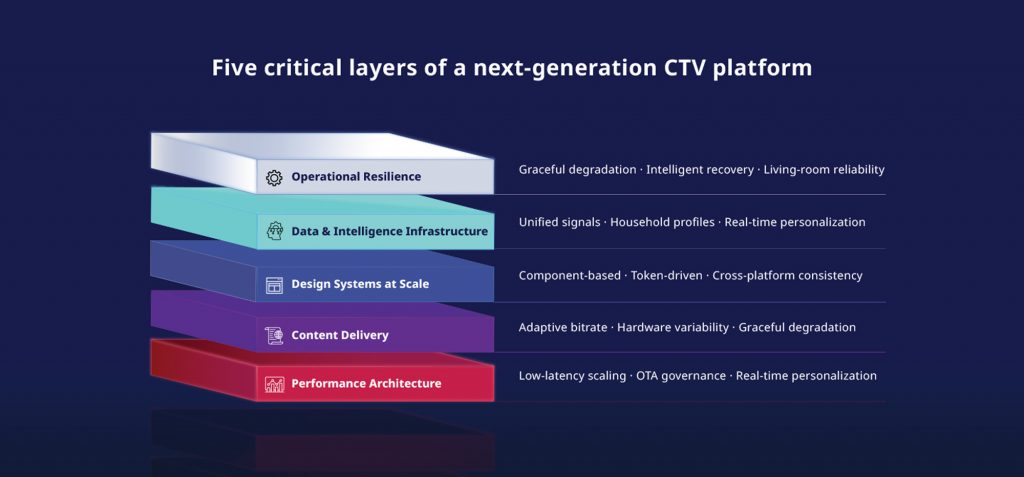
Five-layer platform engineering stack for CTV design spanning performance architecture through operational resilience

1) Performance architecture

CTV platforms must support low‑latency live‑event scaling, real‑time personalization without playback degradation, and safe over‑the‑air update governance across device fleets. Few organizations can deliver all three without stability trade‑offs.

2) Content delivery

Content delivery must account for extreme hardware variability, from premium Apple TV devices to constrained Android TV environments.

3) Design systems at scale

Component‑based, token‑driven systems enable consistency across Roku, Fire TV, Apple TV, Samsung, LG, and Android TV without fragmenting experiences.

4) Data and intelligence infrastructure

Personalization, recommendations, and cross‑device continuity require unified signal processing across household profiles. This is the layer where AI either compounds or collapses, and it is only as good as the data architecture beneath it.

5) Operational resilience

Living rooms are unpredictable environments. Graceful degradation and intelligent recovery are non‑negotiable.

Building Discovery+ across mobile, web, and smart TVs required every one of these layers to work in harmony, under the pressure of live production environments across fragmented device ecosystems. It is precisely this kind of at-scale, multi-platform engineering that reveals where theoretical frameworks meet real-world complexity.
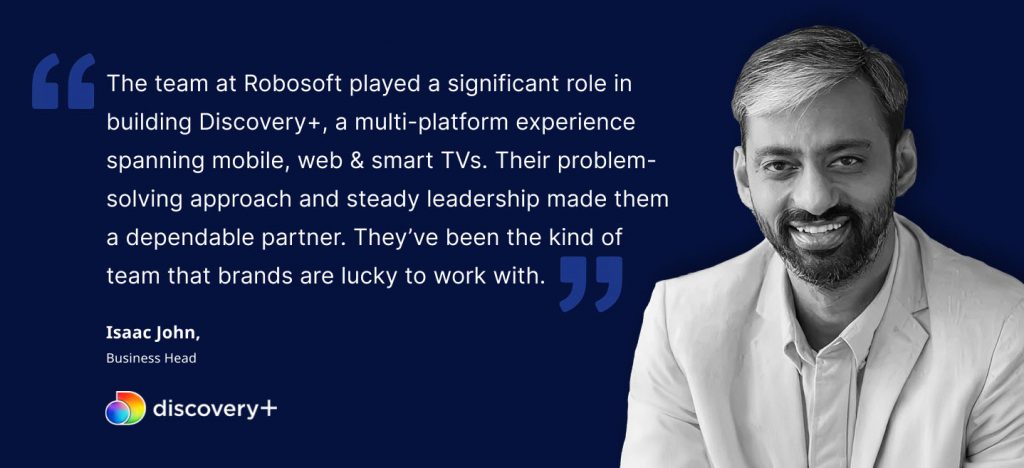
Client testimonial on Robosoft's Connected TV engineering capabilities from the Discovery+ multi-platform project

What the next three years of Connected TV will look like

Next‑gen CTV platforms are already incorporating capabilities that move well beyond content delivery:

  • AI‑curated home screens replacing static content rows
  • Retail media becoming a primary monetization layer alongside subscriptions
  • Voice‑first navigation replacing remote‑driven search
  • Cross‑platform identity graphs enabling seamless, continuous viewing
  • FAST ecosystems rivaling traditional broadcast channels in reach and targeting
  • Mood‑driven search using natural language
  • Cross‑device intent recognition, with mobile to TV continuation becoming a standard expectation
  • Dynamic personalization evolving continuously, not set once at onboarding

The platforms investing in these capabilities now will define household viewing habits for the next decade.

The Robosoft perspective

Connected TV should be engineered as a household platform capability, where experience design, data intelligence, monetization systems, and operational resilience are built together, not layered sequentially. This is what separates functional CTV applications from platforms that deliver sustained retention and monetization.

When CTV is engineered as a platform:

  • Household economics improve as multi‑user engagement compounds lifetime value
  • Switching friction increases once routines and personalization are established
  • Brand perception strengthens because the big screen is the most visible proof of quality

For media and entertainment organizations, the question is whether Connected TV is engineered to deliver intent‑predicted engagement, FAST‑ready monetization, and living‑room reliability across fragmented device ecosystems.

Robosoft partners with streaming teams to design and engineer next‑generation CTV platforms that scale under peak conditions and perform consistently in real‑world household environments.
Let’s discuss your CTV strategy.

Read More
UX/UI Design

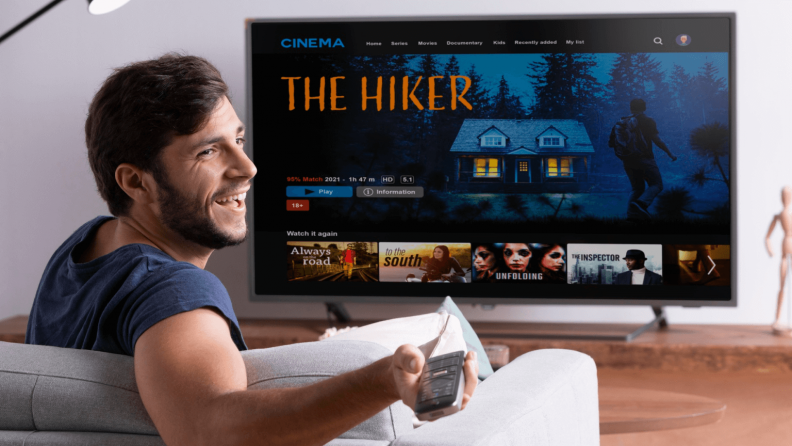
Designing for Connected TV: all you need to know to capture attention on the big screen

The way people consume content today is no longer confined to a single screen. The rapid adoption of Connected TV (CTV), the surge in mobile and tablet usage, and the explosion of streaming platforms have redefined viewing behavior.

The Leichtman Research Group highlights this shift in behavior. It reveals that two-thirds of U.S. TV households use more than one type of connected TV device, with an average of nearly four devices per home.

This evolving CTV ecosystem presents both an opportunity and a challenge for design teams. This blog explores the key design principles and real-world practices that can help product design teams create consistent and intuitive CTV experiences across devices.

Understanding the Connected TV ecosystem

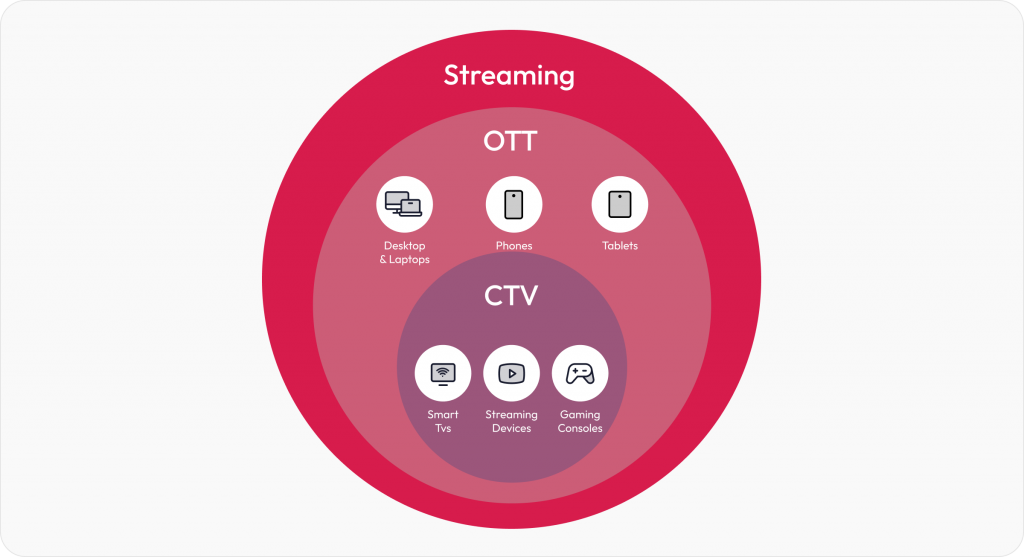
Connected TV (CTV) refers to devices that let users stream video content directly to a television screen using an internet connection. This includes Smart TVs with built-in apps, streaming media players like Roku, Amazon Fire TV, and Apple TV, as well as gaming consoles such as Xbox and PlayStation.

CTV ecosystem

While CTV is a part of the larger OTT (Over-The-Top) ecosystem, it’s important to note the distinction. OTT covers all internet-based streaming, including mobile phones, tablets, laptops, and CTVs. But CTV is focused entirely on the TV screen experience, which often becomes the centerpiece of home entertainment. 

CTV design best practices

Designing for Connected TV isn’t just about scaling up mobile or web interfaces. It demands its own design thinking. 

The following best practices tackle the challenges faced while designing for CTV. Drawn from our work on platforms like Discovery+, these guidelines form a practical roadmap for building seamless, intuitive CTV applications that delight viewers across devices.

Visibility and clarity

1. Design for the 10-foot CTV experience

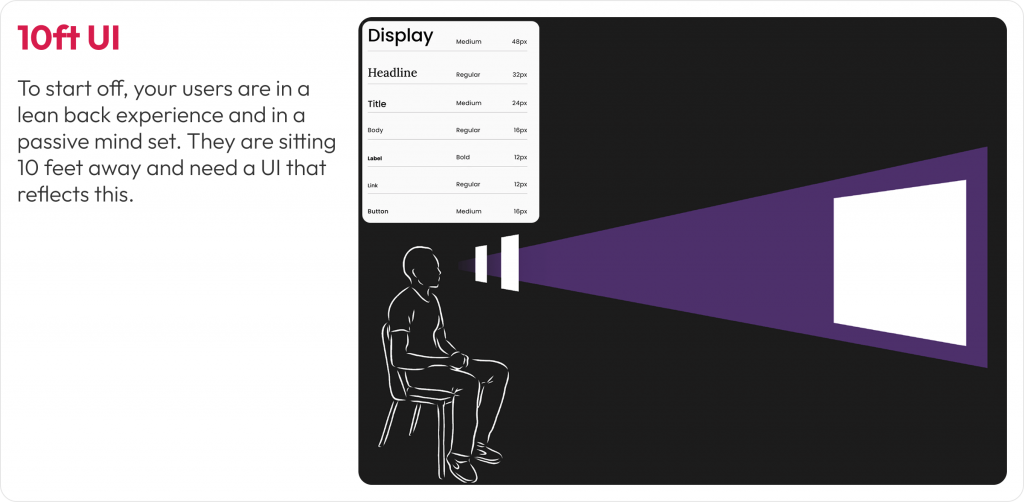
Designing for TV screens is about rethinking how people interact with content from a distance. Most users view Connected TVs from 6 to 10 feet away, in a relaxed, lean-back position. This unique setting changes everything about how your UI needs to behave. 

The 10-foot experience requires larger, bolder interface elements and a layout that communicates clearly from afar. 

What we encountered

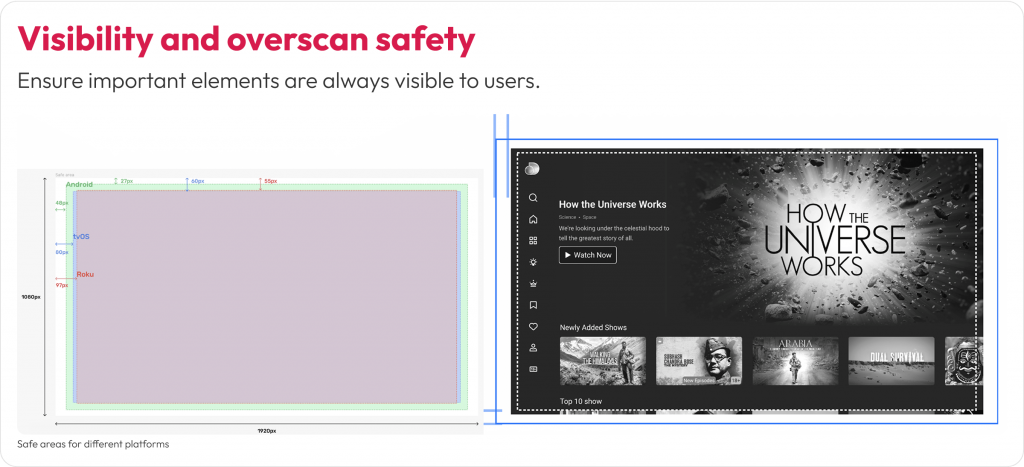
When designing the Discovery+ CTV platform, we noticed that poster titles and CTAs weren’t consistently visible on all TV models. This happened because some TVs, especially older or lower-end ones, still apply overscan, where the edges of the screen content are cropped to fit the display. As a result, critical UI elements near the bottom and sides of the screen would sometimes get cut off, making them hard to read or interact with.

How we solved it

We defined safe margins (5% padding) across all edges to prevent cutoff and ensured that critical elements like show titles and episode actions appeared in center-aligned zones, where the viewer’s attention naturally falls. We also refined gradients so they never interfere with text visibility.

10ft UI Connected TV experience design

Image: Adapting layout, typography, and element placement for users in a lean-back mode

2. Design for overscan and safe areas

Not all TVs display content edge to edge. Some older or lower-end models still apply overscan, cutting off the outer margins of the screen. That means anything placed too close to the edge risks being partially or completely invisible to users.

Users may miss navigation cues, buttons, or labels that fall outside the “safe” visual zone. This can disrupt content discovery and lead to frustrating experiences where key actions (like ‘Play’ or ‘Watchlist’) are hidden from view.

What we encountered

In our early Discovery+ TV prototypes, poster titles and action buttons near the bottom and corners were inconsistently visible across screen models. Text overlapped with the gradient on some TVs or was pushed out of view entirely. This created confusion during usability testing, especially when users tried to interact with shows directly from thumbnail rails.  

How we solved it

We implemented platform-specific safe area guidelines, maintaining at least a 5% margin on all sides. On a 1920×1080 screen, that’s roughly 48 pixels horizontally and 27 pixels vertically. We also reworked the gradient overlays used behind posters so they didn’t obscure titles, and relocated actions like ‘Play’ or ‘Add to Watchlist’ into the safe zones, either center-aligned or inset with adequate spacing.

Visbility and overscan safety for CTV

Image: Designing within the platform-specific margins to prevent critical UI elements

Ease of interaction

1. Optimize navigation for D-Pad using remote control

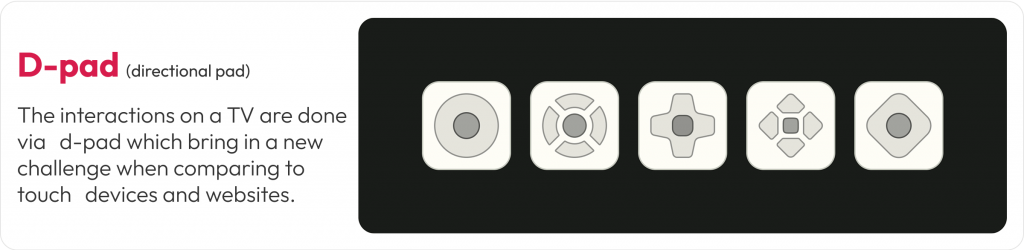
Unlike mobile apps that rely on touch or desktop apps that use a cursor, CTV apps are controlled primarily through four-directional (D-pad) navigation. That means every interaction needs to be linear, predictable, and instantly responsive to remote input.

D-pad navigation design for CTV

D-pad navigation reduces the number of actions users can take at a time. This makes clarity of focus and smooth directional movement essential. If users can’t immediately see where the focus will move next, or worse, get stuck, it creates friction that leads to drop-offs. 

What we encountered 

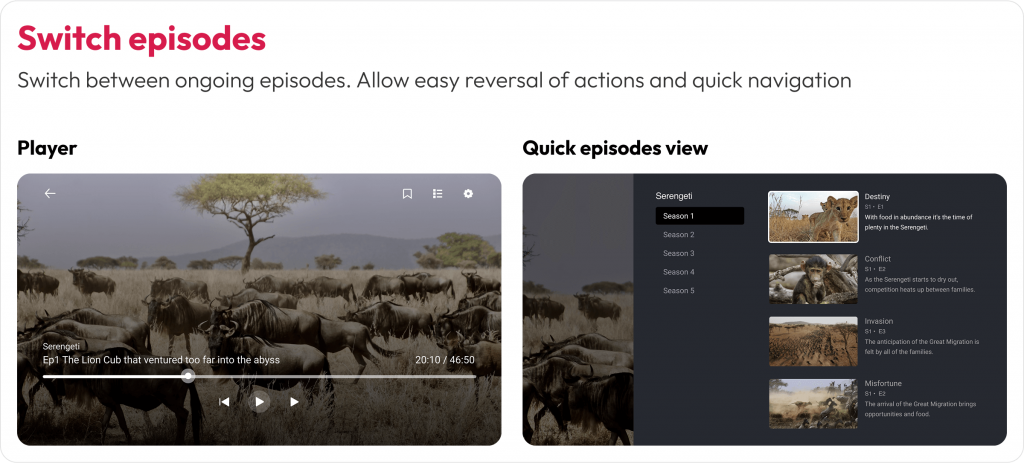
While designing for Discovery+, we noticed that users had trouble switching between episodes and rows. Some users struggled to reverse actions or weren’t aware they could move between thumbnail rails. Simple tasks like finding the next episode became unnecessarily complex without visible feedback or directional cues.  

How we solved it 

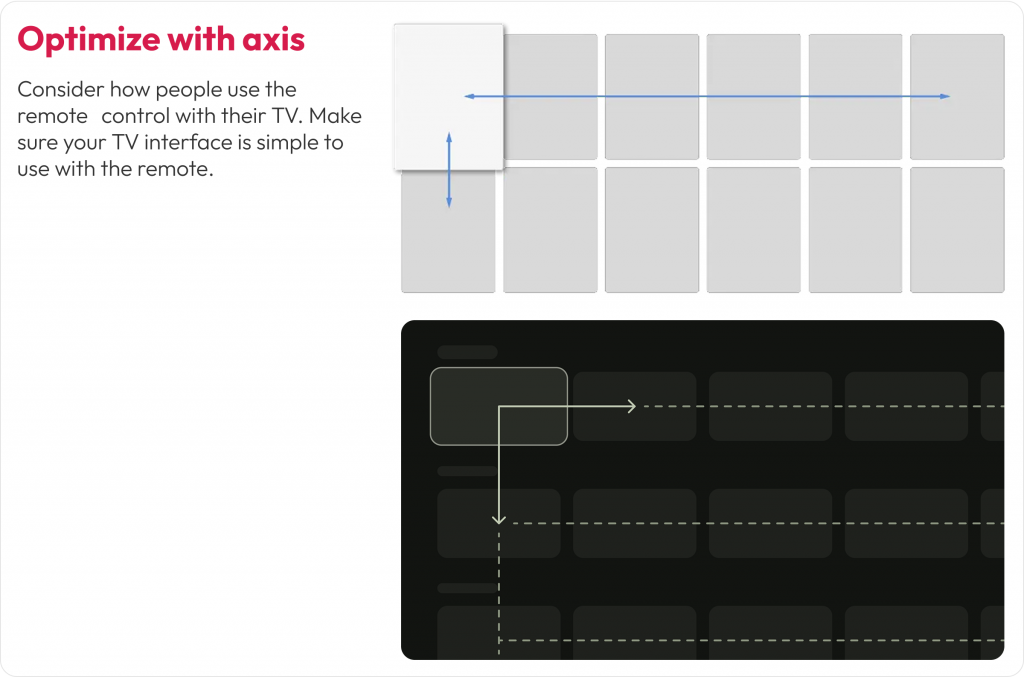
We created a D-pad simulation prototype and tested it across multiple TV models and remotes. This helped us fine-tune how the focus ring behaved, especially during transitions across rows and within episode carousels. We introduced subtle motion effects and highlight cues to clearly show the user where they were and where they could go next.

Optimize with Axis for Connected TV

Image: This layout ensures users can move smoothly between content blocks with clear directional focus

2. Design for voice interactions

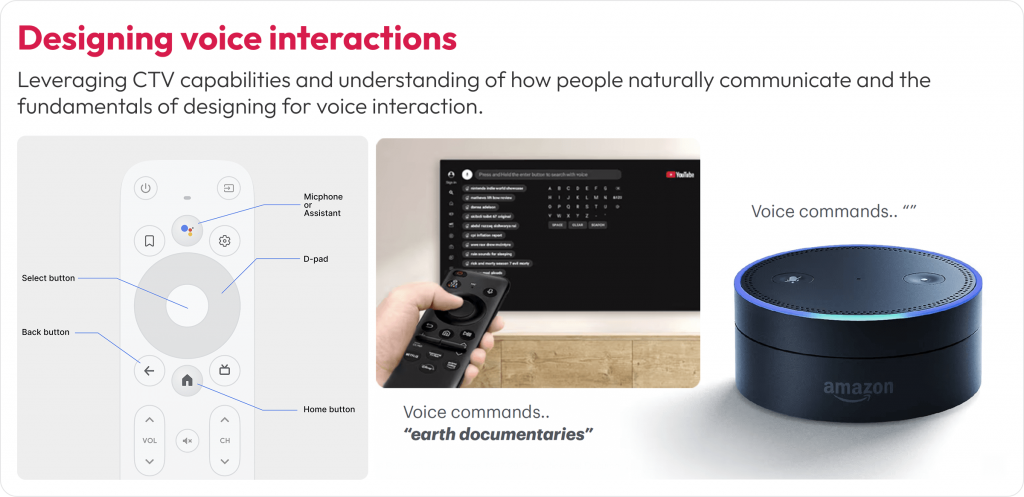
Typing on a TV with a remote control is slow and often frustrating. As more users turn to voice assistants for navigation, search, and content discovery, supporting natural voice interactions across your CTV experience is essential.

Remote-based input makes complex interactions like logging in, searching for a show, or filling out a form time-consuming. Voice control offers a faster, more intuitive path. If your app doesn’t support or prioritize voice input, it can cause drop-off right at the entry point.

What we encountered

During usability testing for Discovery+, we noticed users instinctively looked for the voice icon before attempting to type using the on-screen keyboard. In some cases, users delayed interaction because the voice search was not prominently positioned. Others tried to use their native smart assistant (like Alexa) even when the app hadn’t been optimized for it.  

How we solved it

We repositioned the voice search icon as the first-choice input method on the search screen. We also designed the UI to reflect a voice-first experience, allowing users to bypass typing unless absolutely necessary. For returning users, we reduced login friction by enabling authentication via mobile-to-TV handoff and highlighting it during onboarding.

Connected TV design for voice interactions

Image: The search screen design prioritizes voice input over keyboard input. The voice icon is placed first in the input flow for easier access

3. Designing for accessibility

A well-designed Connected TV experience isn’t complete unless accessible to everyone. People with low vision or blindness rely on screen readers and audio cues. Those with hearing difficulties need clear visual alternatives to any sound-based feedback.

What we encountered

During our design process, we identified accessibility challenges around quick access to previously watched shows and episodes within them. Users also had difficulty identifying selected states or navigating between episodes. People relying solely on audio or voice inputs also struggled due to insufficient feedback or context around these interactions.

How we solved it

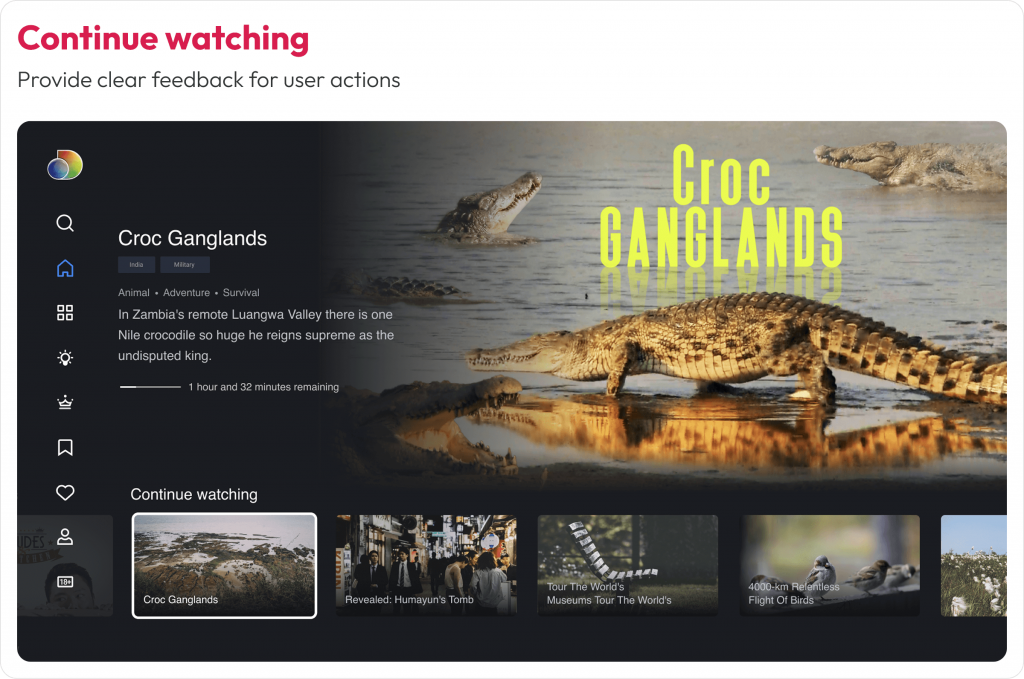
We reworked the “Switch Episodes” and “Continue Watching” rail with stronger contrast, added a clear focus ring, and paired visual states with subtle audio ticks. Hence, users receive visual and audible confirmation. Also, we enabled shortcuts, “Play next episode,” “Add to Watchlist,” and “Skip intro.”

Switch episode CTV design best practice

Image: Accessible navigation with clear focus states for seamless episode switching

Continue watching option in CTV

Image: High-contrast highlights for easy content resumption 

Personalization for shared devices

1. Support multi-profile personalization

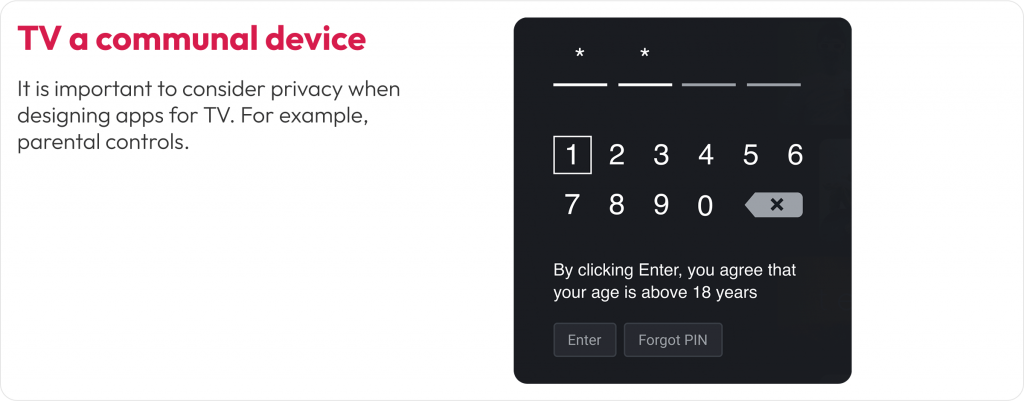
Unlike mobile or personal laptops, Connected TVs are shared household devices. That means your design must serve multiple users with different preferences, age groups, and viewing habits, often on a single screen.

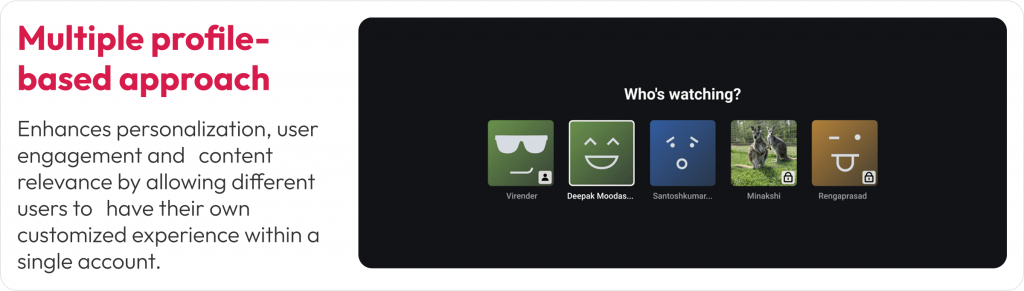
A personalized experience increases engagement, retention, and satisfaction. Without profile-specific settings, users may encounter irrelevant content, lose their watch history, or face inappropriate recommendations, especially in homes with both adults and kids.

CTV multi profile personalization

Image: Custom profiles support personalized content and parental controls. Visual cues and icons help differentiate user types at a glance

What we encountered

In our Discovery+ design exploration, we realized that a single user profile wouldn’t serve a typical household. Users wanted their own watchlists, tailored recommendations, and age-appropriate content controls. The absence of these features often led to confusion and frustration, especially when kids used the platform unsupervised.

How we solved it

We implemented a multi-profile entry screen that appears at app launch, allowing each household member to pick or create their own profile. Each profile carried personalized preferences, viewing history, and even watchlist continuity across devices. For child profiles, we activated parental controls that filtered out adult content and enabled safer exploration.

Privacy while designing apps for TV

Image: User profiles restrict content based on user age with Parental Controls. e.g. kids-friendly profile – Disney+ Kids Mode ensures children see only family-friendly movies and shows

2. Ensure UI consistency across streaming platforms

A single household might stream content on a Roku TV in the bedroom and an Apple TV in the living room. While each platform has its own design guidelines, users expect a consistent experience across all of them.

Inconsistent navigation, layout, or visual styles across devices can lead to confusion. If users feel like they have to relearn your app every time they switch platforms, it creates friction, and they may choose a more familiar service instead.

What we encountered

During the Discovery+ rollout, we had to support a wide variety of platforms, including Roku, Fire TV, Android TV, Apple TV, and WebOS. Each had unique limitations, remote behavior, and UI rules. For example, Fire TV had stricter safe zones, Apple TV emphasized integration with Top Shelf and system features, and Roku had performance limitations on lower-end devices.

How we solved it

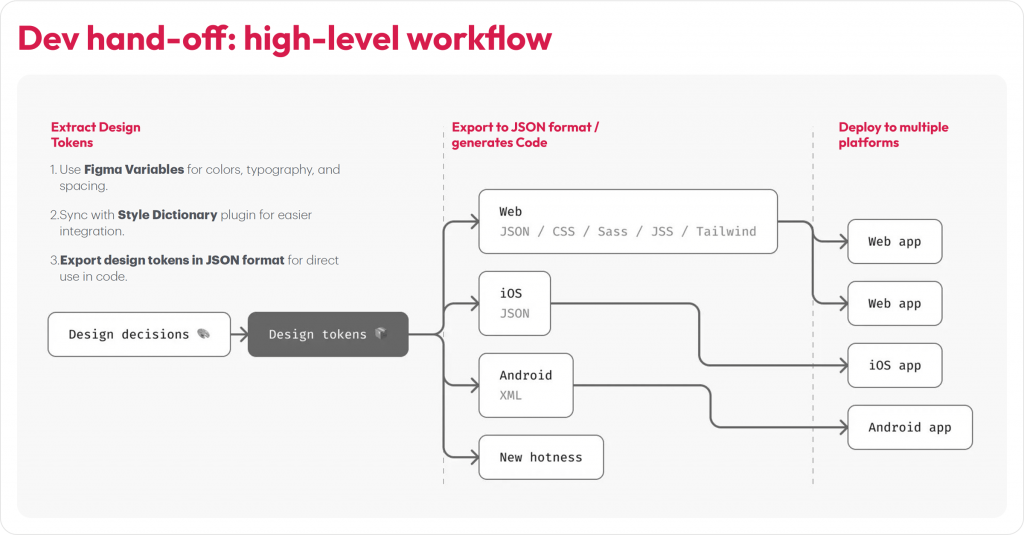
We designed using a component-based system built in Figma, with reusable tokens for typography, spacing, and color. These tokens were exported via JSON and synced with our developers’ codebase using the Style Dictionary plugin. This ensured the core design structure remained consistent while allowing each platform to inherit its native interactions and system behaviors.

component-based system built in Figma for CTV design handoff

Image: Discovery+ UI components adapted for Apple TV, Roku, and Android TV. Core layout and interactions stay consistent while following platform-specific design norms

While no guideline is one-size-fits-all (gaming UX, for instance, follows its own unique rules), the practices above offer dependable direction for creating seamless, intuitive experiences across CTV and companion devices.

Conclusion

The Connected TV market is set to double (from USD 267B in 2024 to USD 530B by 2030) in the next five years, making it the ideal moment for designers and product teams to stake their claim in this rapidly growing space. By understanding each platform’s nuances, designing for real-world viewing environments, and following proven best practices as demonstrated in this guide, we can craft captivating, user-friendly TV applications that delight viewers across devices and platforms.  

At Robosoft, we’ve partnered with leading media, news, and entertainment brands to build end-to-end OTT solutions with capabilities across product strategy, design, engineering, analytics, and monetization. Whether targeting a regional Smart TV market or aiming for global reach, our team can help deliver world-class multi-device experiences across platforms. Ready to connect with your audience on every screen?

contact us for CTV experience design

Read More